How to Convert a JPG or PNG to MP4 Online
You have one still on the desktop. Instagram, TikTok, a client portal, or an ad account will not take the JPG. Search results for image to video converter are mostly slideshow makers: Ken Burns zoom, three seconds per photo, optional music. That is a playlist of stills.
If you need the photo itself to move—a slow push-in, steam off a cup, a product turning a few degrees—you are converting a file and generating motion. This walkthrough gets you a downloadable MP4 from one PNG or JPG, then the extra passes that actually make the clip usable.
Three jobs people call “convert image to video”
You used What you got Use it when FFmpeg, CloudConvert, a “JPG to MP4” site The same frame held for N seconds The form only checks “is this an .mp4?” CapCut / Premiere Ken Burns The still, cropped over time A slow zoom is enough An AI image to video converter Camera move + subject motion from that still A person has to watch it
| You used | What you got | Use it when |
|---|---|---|
| FFmpeg, CloudConvert, a “JPG to MP4” site | The same frame held for N seconds | The form only checks “is this an .mp4?” |
| CapCut / Premiere Ken Burns | The still, cropped over time | A slow zoom is enough |
| An AI image to video converter | Camera move + subject motion from that still | A person has to watch it |
Row one is format conversion. Row three is the job this article is for.
What has to be true about the still
The model invents motion. It does not invent a better photo.
- Subject fully in frame. Anything already cut by the edge smears.
- Even light. Blown highlights are where faces and labels break.
- No price, CTA, or headline baked into the JPG. Add that in an editor after export.
- Real pixels. A 400px thumbnail from a product page has nothing to work with.
On picmovi the upload is PNG / JPG / JPEG / WEBP, max 10MB, 300×300 to 3000×3000. Resize oversized files before you start.
Convert one image to MP4
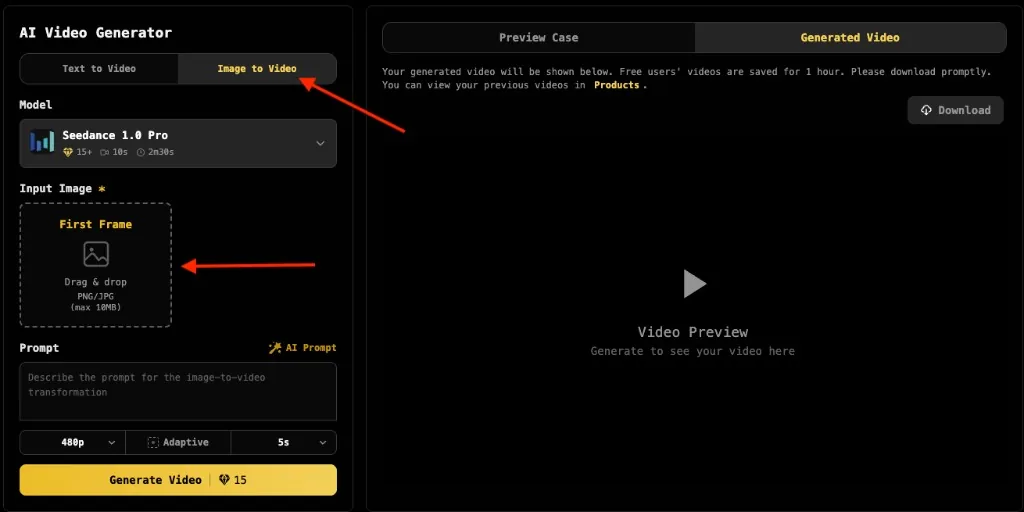
1. Open an image to video converter, drop the file
You do not need a desktop encoder. Open an photo to video converter, stay on Image to Video, and drop the file into First Frame. That slot is what keeps the face or the product recognisable.
Text to Video ignores the file and invents a new scene. If the still is the source of truth, do not switch tabs.
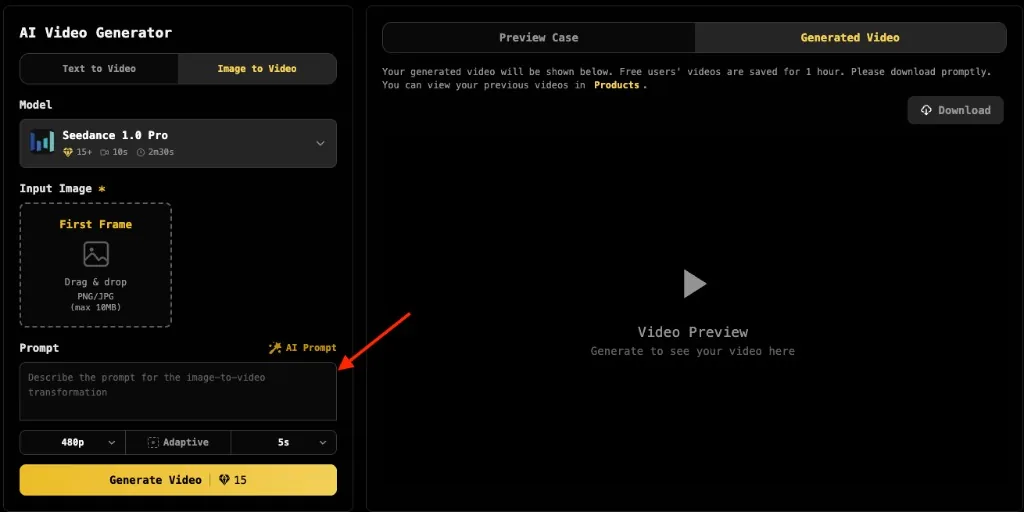
2. Write motion, not a caption
The model can see the photo. Name three things:
- Camera: slow push-in, gentle parallax, static
- Subject: hair moves, product rotates, steam rises
- Constraint: no new objects, no morphing logo, no text
Example:
cinematic, epic, and 8k do not say what should move. transform and add a person invite a different subject.
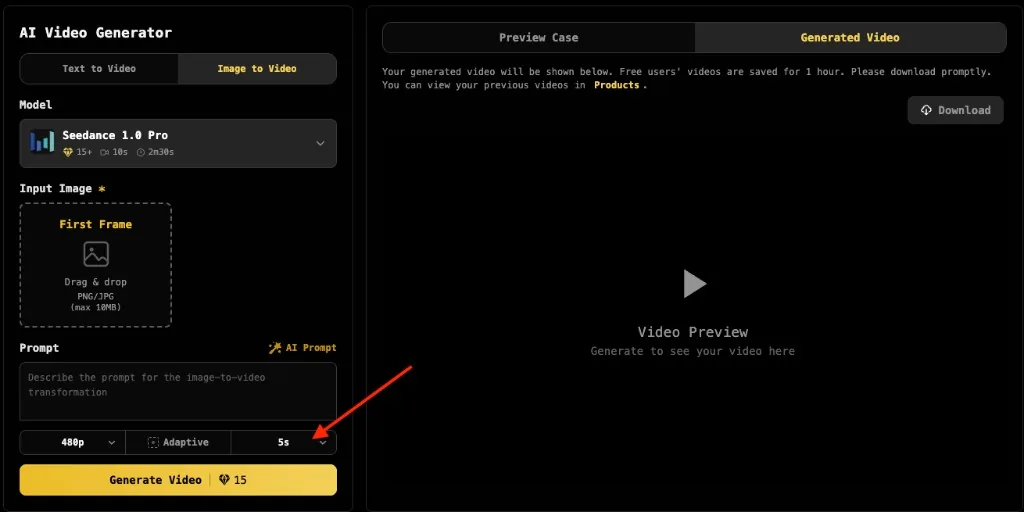
3. Lock 5 seconds and a ratio before you spend a high-res run
One image → one short clip. Start at 5 seconds. A problem you can see at 5s is still there at 10s, and it costs more. That also matches the search people actually type: a 5-second video from one image.
- 9:16 for Reels / TikTok / Shorts
- 16:9 for YouTube or a site hero
- 1:1 for feed posts
- Adaptive keeps the photo’s own framing until you know the placement
Leave resolution at 480p or 720p while you are still testing motion. Re-run the winning prompt hotter later.
4. Generate once, watch once
Sign-in is what unlocks free credits. Watch the clip through without scrubbing:
- Did the subject stay the same person or product?
- Did the camera do the one move you asked for?
- Did any label or edge melt?
If one of those is wrong, change one line in the prompt and run again. Rewriting the whole sentence hides which edit worked.
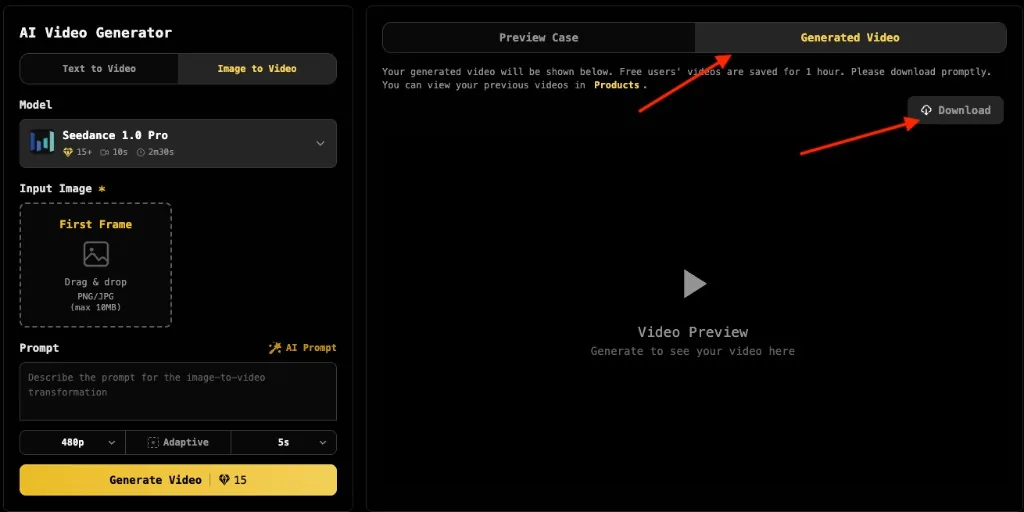
5. Download the MP4 and keep a local copy
The result lands under Generated Video. Download immediately—free runs can expire. Paid exports are typically clean. Earlier takes stay in history, so you do not re-upload the source.
After the first MP4: the part that actually improves the clip
A first export that “kind of moves” is not the end of converting a JPG to MP4. The next 10 minutes are where most keepable takes come from.
Change one clause. Identity drifted → add identity locked or face stays identical. Camera orbited off-frame → static camera or slow push-in only. A second object appeared → no new objects. Then generate again.
Switch the model before you rewrite the brief. Seedance, Kling, and Wan fail in different ways on the same still. If two prompt tweaks still break the face or the logo, keep the sentence and change the engine.
Add a last frame when you need a loop. For a product turn or a Reels bumper, a last-frame still lets the clip open and close on compositions you chose. Skip this on the first test; add it once 5s motion is already sane.
Re-run the winner at a higher resolution. Do not start at 1080p. Confirm the move at 480p/720p, then spend the extra credits on the take you would actually post.
Put type in the editor, not in the photo. Captions, price, and CTA belong in CapCut, Premiere, or the ads manager. Baking them into the JPG is how they melt in the generate step.
Prompt scraps that survive a first run
Still Start from this Portrait Static camera, natural blink, hair moves in light wind, identity locked.Product on white Static camera, product rotates slowly 30 degrees, reflections consistent, no text.Interior / landscape Gentle parallax, clouds drift, water moves, structures stay solid.
| Still | Start from this |
|---|---|
| Portrait | Static camera, natural blink, hair moves in light wind, identity locked. |
| Product on white | Static camera, product rotates slowly 30 degrees, reflections consistent, no text. |
| Interior / landscape | Gentle parallax, clouds drift, water moves, structures stay solid. |
FAQ
Is this the same as a photo to video converter?
Same job, different search box. Photo to video converter and image to video converter both mean: one still in, an MP4 out. Slideshow tools still will not give you subject motion.
Can I turn several photos into one video?
That is a timeline edit (slideshow or cuts), not this workflow. Here you convert one JPG or PNG into one short clip. Stitch clips later if you need a longer piece.
Can I do it for free?
Free credits are enough to learn what the still can do. Do not title the post around “unlimited free.” Save the local MP4; free outputs may watermark or expire.
When is FFmpeg still right?
CI artifacts, silent hold-frames, placeholders. If a human watches the file, generate motion.
Wrapping up
Converting a JPG or PNG to MP4 is two different tickets. If the frame must stay frozen, any file converter will do. If the still has to read as footage, you need an image to video converter: one clean photo, one sentence of camera and action, one 5-second export—then one prompt edit, or one model switch, before you call it done.

评论
发表评论